


MarketSurge
4.245.00 Reviews
App Specs
- Version
- 6.5.5
- Updated On
- License
- Free
- Downloads
- 50,000+
- Developer
- Dow Jones & Company, Inc.
- Categories
- Finance
- Platform
- Android
Screenshots
 Analysis by AppCompare
I judge a finance app first by whether its purpose is clear and whether I can make sensible choices about what I share. MarketSurge is a stock-research app from Investor's Business Daily, LLC, so I would approach it as a tool for studying investments rather than as a general-purpose place to manage every part of a household budget. That distinction matters: a focused research app can help me examine stocks, but it should not be mistaken for a bank account, a financial plan, or a substitute for deciding what risk I can afford.
What I would check before relying on it
MarketSurge is free to install, and its age rating is Everyone 10+. Its current version is 6.0.2, and the app has passed 50K+ installs. Those details help set expectations about its availability and audience, but they do not tell me whether a particular research workflow fits my needs. I would treat the app as one input in my own process, then verify important figures and decisions before acting on them.
The visible user choice that matters most is whether to use a specialist stock-research app at all. If my goal is to follow a few holdings, I might be satisfied with a brokerage app or a basic market-watching tool I already use. If I want a more research-oriented place to compare ideas, MarketSurge is more relevant. I would not install it simply because I need help tracking everyday spending; its confirmed purpose is investment research, not household budgeting.
Keeping the research process deliberate
I find it useful to decide what question I am trying to answer before opening any market tool. For example, I might be checking whether a company deserves more attention, reviewing a stock already on my watchlist, or comparing a new idea against an existing holding. Starting with one question keeps a research session focused and makes it easier to notice when I am just browsing headlines or reacting to short-term price movement.
That habit is especially helpful on a phone, where quick checks can turn into impulsive decisions. I would use a short session to gather context, make a note of what still needs verification, and then step away rather than treating a screen full of market information as a buy or sell instruction. A research app can organize the investigation; the responsibility for the decision remains mine.
Where caution still belongs
There is a meaningful difference between finding a stock worth researching and deciding it belongs in a portfolio. A tool can make the first step easier without answering personal questions about time horizon, diversification, or how much loss I could tolerate. I would pair any research with my own written reasons for considering a trade, and revisit those reasons instead of relying on a single glance at an update.
Market information can also encourage overchecking. If I catch myself opening the app repeatedly without a clear question, I would set a simple routine—such as reviewing a watchlist at a planned time—rather than letting every market movement interrupt the day. That is a practical safeguard, not a feature claim: it keeps the user in control of attention and avoids confusing frequent monitoring with better analysis.
Worth Reading Before You Choose

EA SPORTS FC Mobile 26 Is a Bigger Football Game, but It Takes Time

Flipboard Shows What News Apps Must Do Beyond the Feed

Switching to Android Auto Means Rethinking Your Driving Routine

Google Calendar Makes a Crowded Week Easier to Manage

Ludo King Makes the Most of the Minutes Between Plans

Baby Panda World Brings Quick Play to Modern Phones, but Its Game Library Feels Busy
Getting Started with MarketSurge
First things first, downloading and setting up MarketSurge was a breeze. Available on both Android and iOS, the app took mere seconds to install. Once I fired it up, I was greeted with a clean and user-friendly interface that immediately put me at ease. No clutter, no fuss—just the way I like it.
After a quick sign-up process, I was prompted to link my bank accounts. Rest assured, all your data is securely encrypted, so you can breathe easy knowing your information is safe. The app supports a wide range of banks, making it accessible for everyone. Talk about convenience!
Exploring the Features
Now, let’s dive into the juicy details. One of the standout features of MarketSurge is its ability to track expenses in real-time. The app automatically categorizes your spending, giving you a detailed breakdown of where your money is going. I found this particularly useful as it highlighted my coffee shop splurges—oops!
Another nifty feature is the budgeting tool. You can set monthly limits for different categories, and the app will notify you if you're getting close to your threshold. It’s like having a personal financial advisor in your pocket, keeping you accountable without the hefty fees.
MarketSurge also offers insightful financial reports. The visual graphs and charts make it easy to understand your financial habits at a glance. I was impressed by how it transformed complex data into simple, digestible insights.
Investment Tracking Made Simple
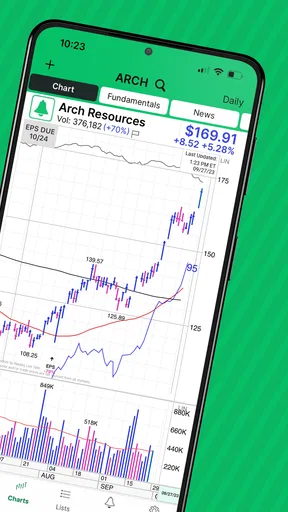
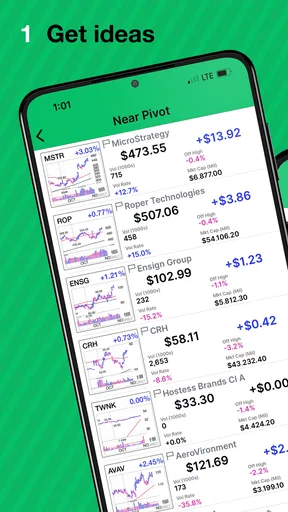
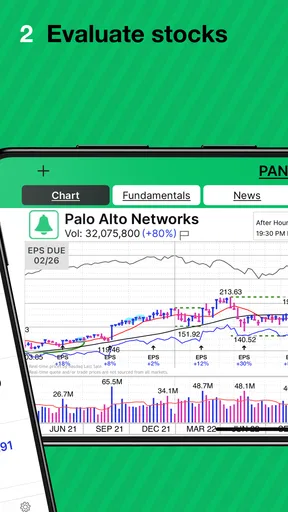
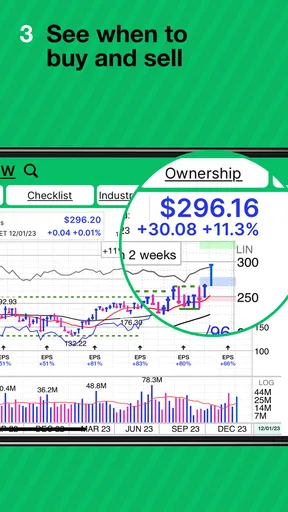
If you dabble in investments, you’ll love MarketSurge’s investment tracking feature. The app allows you to monitor your portfolio effortlessly. I could check stock prices, track performance, and even receive news updates on my investments—all within the app.
For someone like me who’s not a financial wizard, this feature was a lifesaver. It demystified the world of investments and made it accessible for a novice like myself. I felt more informed and in control of my financial future, which is a pretty empowering feeling.
Customer Support and Community
Now, what happens if you hit a snag? Fear not, MarketSurge has got you covered with its excellent customer support. I had a query about customizing my budget categories, and the response was swift and helpful. Their support team is knowledgeable and friendly, making the experience all the more pleasant.
Additionally, MarketSurge boasts a vibrant community of users. The app includes a forum where you can exchange tips and advice with fellow users. I found it particularly helpful to see how others manage their finances and picked up a few tricks along the way.
The Final Verdict
So, what’s the bottom line? MarketSurge is a robust and reliable app that simplifies personal finance management. Its user-friendly interface, comprehensive features, and supportive community make it a top contender in the finance app space.
Whether you’re a budgeting newbie or an investment enthusiast, MarketSurge has something for everyone. It empowers you to take charge of your finances with confidence and ease. So, if you’re ready to revolutionize the way you handle your money, give MarketSurge a try. You might just find it’s exactly what you’ve been looking for.
Ready to take the plunge? You can download MarketSurge from the App Store or Google Play and start your journey towards financial mastery today!
A realistic routine for an individual investor
Imagine I have a free moment before work and want to check whether a company I have been following still deserves a closer look. I would open the research app with a specific purpose, review the information relevant to that decision, and write down what I still need to check later. I would avoid turning a quick morning scan into an automatic trade. That distinction is useful for newer investors: research can help form a question, while a separate plan should determine whether and when to act.
For a more careful review, I would compare a candidate with the reason I added it to my watchlist in the first place. If the original reason was a business trend, a price change alone would not settle the question. I would also check whether the information is current enough for the decision I am considering. A mobile interface makes it easy to look things up, but convenience should not make me skip verification when money is on the line.
Choosing the right kind of finance app
Finance apps serve very different jobs. A brokerage app is the more natural choice when the main task is placing trades or seeing account balances. A budgeting app is better suited to categorizing income and expenses. A general market app can be enough for someone who only wants a quick quote or a broad news check. MarketSurge makes the most sense when the user’s central task is stock research and they want a dedicated environment for that work.
That focus is also a trade-off. If I want a single app to handle bills, cash flow, savings goals, and trading, this is not the role I would expect a stock-research product to fill. Nor would I treat research material as a personalized recommendation. The app may help organize what I am studying, but choosing a portfolio still calls for judgment that accounts for my own finances and tolerance for risk.
A useful way to avoid app-hopping is to assign each tool one job. I might use a brokerage for account actions, a separate source for company filings or other primary information, and MarketSurge for structured stock research. That division can reduce confusion about which screen is showing analysis, which is showing an account, and which one is actually capable of carrying out a transaction. It also makes it easier to spot when I am relying too heavily on one source.
Costs, access, and practical expectations
The app is free to download, but in-app purchases are listed at $149.99 per item. I would check the purchase details and terms shown in the app before committing to anything, and decide in advance whether a paid option matches how often I research stocks. Someone who only checks a couple of companies now and then may not get enough value from a paid research workflow; a more active individual investor may judge the expense differently. The key is to evaluate the specific offering rather than assuming that installing the app makes every part of it free.
Its average rating is 4.0 from 193 ratings, with 45 written reviews. I see that as a broad signal of how users have responded, not proof that the app will suit my habits or that its research should be accepted without checking. Reviews can help identify recurring usability concerns, but they cannot tell me whether the analysis fits my strategy. I would use them as one small part of deciding whether to try the app, not as an investment endorsement.
Before paying for anything, I would also ask a practical question: will I use the research often enough to make the cost worthwhile? A casual investor who checks a handful of stocks occasionally may be better served by free tools and primary sources. Someone who regularly compares companies and wants a more dedicated research routine may have a stronger reason to explore the paid options. Either way, I would make the decision after seeing exactly what the purchase includes, not based on the promise of becoming a better investor overnight.
How I would handle personal and account information
When a finance app asks me to create an account or connect financial services, I slow down and read the prompts rather than tapping through them. I look for what information is being requested, why the app needs it, and what settings or account controls are available. I only connect an account if that connection is necessary for a task I genuinely want to perform. If a permission or request does not make sense to me, I pause and seek clarification before proceeding.
I also separate the app’s role from assumptions about privacy or security. A familiar developer name or a polished screen is not, by itself, evidence about how data is handled. I would review the current privacy and account information presented in the app and the relevant platform settings, then make a choice based on what I can actually see. I would not enter sensitive details just because a setup flow makes it seem like the next step.
For stock research, a low-risk starting routine is to explore what is available without connecting unrelated financial accounts, then decide whether any additional access is necessary. I would keep my sign-in details private, use the account controls available to me, and revisit access if my needs change. These are sensible habits for any financial tool; they are not claims that a particular permission, encryption method, or account feature is present.
Who is likely to get the most from it
I would recommend trying MarketSurge to an individual investor who wants to make stock research a more deliberate part of their routine and is willing to verify important details before making decisions. It is a less obvious fit for someone who wants only basic market headlines, a portfolio transaction screen, or a complete personal-budgeting system. Beginners can use a research app, but they should not confuse a clear presentation with a guarantee that they understand every risk behind a stock.
If I were new to investing, I would start with one company at a time, note why it interests me, and distinguish facts I have checked from questions I still need to answer. If I already had a research process, I would judge the app by whether it saves time or helps me stay organized—not by how many screens or alerts I can open. That simple test makes it easier to decide whether a specialist tool is genuinely useful or merely another distraction.
A measured recommendation
MarketSurge is worth considering when stock research is the specific problem I am trying to solve. Its finance focus and the backing of Investor's Business Daily, LLC give it a clear identity, while its free entry point makes it possible to assess whether the experience suits me before considering an in-app purchase. I would still keep my expectations practical: use it to support research, check important information independently, and make decisions according to a personal plan.
My cautious recommendation is to try it if you want a dedicated stock-research tool, but skip it if what you really need is budgeting, banking, or a simple place to execute trades. I would not make a purchase or investment decision in a hurry. Take time to understand the account choices, inspect any paid option, and see whether the app improves your process over a few real research sessions. That is a better test of fit than treating any finance app as a shortcut to confident investing.
Pros
- User-friendly interface for easy navigation.
- Comprehensive analytics and insights tools.
- Real-time updates on market trends.
- Customizable alerts for specific stocks.
- Integrates well with third-party apps.
Cons
- Requires a stable internet connection.
- Some features locked behind paywall.
- Occasional delays in data refresh.
- Limited support for international markets.
- Can be overwhelming for beginners.
FAQs for MarketSurge
What is MarketSurge and what does it offer?
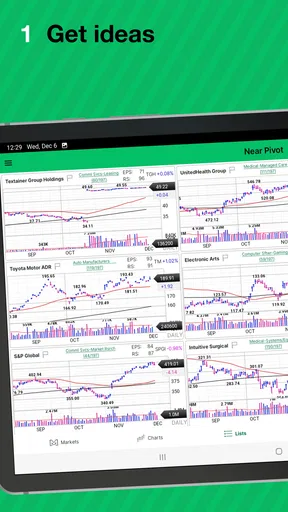
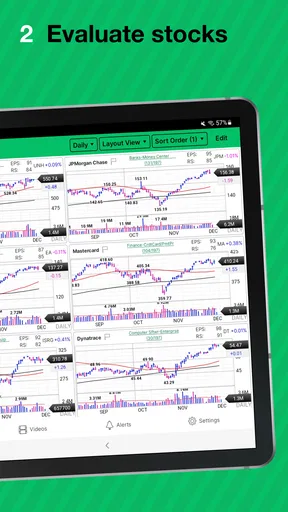
MarketSurge is an innovative app designed for traders and investors, providing real-time market data, analytics, and insights. The app offers a user-friendly interface, advanced charting tools, and personalized alerts to keep users informed about market trends. Whether you're a beginner or an experienced trader, MarketSurge aims to enhance your trading experience.
Is MarketSurge suitable for beginners in trading?
Yes, MarketSurge is designed to cater to both beginners and experienced traders. It offers educational resources, tutorials, and a demo account feature that allows newcomers to practice trading without financial risk. The intuitive design and user-friendly interface make it accessible for those just starting out in the trading world.
How does MarketSurge ensure data accuracy and security?
MarketSurge partners with reputable financial data providers to ensure the accuracy and timeliness of market information. The app employs robust encryption protocols and security measures to protect user data, ensuring that your personal and financial information remains confidential and secure at all times.
Are there any subscription fees or in-app purchases in MarketSurge?
MarketSurge offers a free version with basic features, but for access to advanced tools and analytics, users can opt for a premium subscription. The premium version includes additional features such as advanced charting, premium alerts, and in-depth market analysis. Users should review the app store listing for detailed pricing information.
What devices are compatible with MarketSurge?
MarketSurge is available for both Android and iOS devices, ensuring broad compatibility. The app requires Android version 6.0 or higher and iOS 11.0 or later. Regular updates are provided to enhance performance and introduce new features, ensuring optimal functionality across different devices.


